My Blueprint Saved My Territory in Once Human: A Survivor’s Tale
In Once Human, the ingenious blueprint system preserves your base layout, letting you rebuild your sanctuary in an instant.
Let me tell you, when I first touched down in the weird, wonderful world of Once Human back in 2026, I was just another bewildered soul clinging to a rusty pipe wrench. The Stardust had done a number on everything, and finding a place to call my own felt like trying to hug a shadow. But once I claimed my first patch of land, I realised something – this scratch of dirt inside that glowing white box was going to be my sanctuary. And boy, did I need a way to protect that memory. That’s where the blueprint system came in, and honestly? It’s been a sanity saver. No exaggeration.
I remember standing there, in the middle of my freshly laid foundations, squinting at the build menu. The territory felt flimsy, just a box of boundaries and a half-baked shack. I’d spent hours gathering wood and stone, and the thought of losing that layout to a server reset or my own clumsy demolition made my stomach twist. Then a fellow survivor, a grizzled veteran with a pet deviant floating over her shoulder, leaned in and said, “Save your blueprint, kid. It’s the only thing standing between you and a nervous breakdown.” I took her advice, and now I’m passing it on to you.
How the Blueprint Became My Best Friend
The game doesn’t shout about it, but your territory—everything inside that white border when you enter build mode—is a canvas. You can slap together a box, or craft a twisted steel villa with gardens and a garage. Once I’d finished shaping my little home with a crooked porch and a watchtower I was stupidly proud of, I knew I had to lock it in. The build mode holds the key. Right-click to open the build menu, and look up at the tabs. There it sits: ‘House Blueprint’. That tab is like a quiet librarian who holds all your architectural dreams in neat little folders. I clicked on it and saw a handful of drafts I’d collected from exploring. But for my own masterpiece, I hit ‘Add Blueprint’.
Now, this is where it gets thoughtful. The game gave me a choice: save the entire territory, or just a single building. My territory had a crafting corner, a storage barn, and a water pump I’d rigged together. Saving everything made sense, so I chose that option. It asked for a name, a tag, and a note. I typed “Crooked Porch Haven.” Tagged it “Home.” In the note, I just wrote, “This one has the good vibes.” It might sound silly, but naming it made the virtual structure feel a bit more mine. I hit ‘Confirm’, and into the drafts it went, snug as a bug.
The Day I Had to Rebuild from Nothing
Fast forward a couple of weeks. I decided to move my territory closer to a polluted zone to farm acid. I tore down the old place, packed up my materials, and when I stood on the new plot, I could still feel the ghosts of that crooked porch. My heart sank. Rebuilding from scratch would take hours. And that’s when I remembered my blueprint. I opened the build menu, flipped to the House Blueprint tab, and there it was: Crooked Porch Haven, waiting patiently. I selected the draft, and on the description page, I saw something almost magical—the ‘House Blueprint’ button. I had the required materials stashed in my backpack. I left-clicked where I wanted it placed, and in an instant, the entire territory came alive. The porch tilted exactly the way I remembered, the storage bins lined up, the pump groaning as if it had missed me. It felt like the game winked at me, whispering, “I got you.”
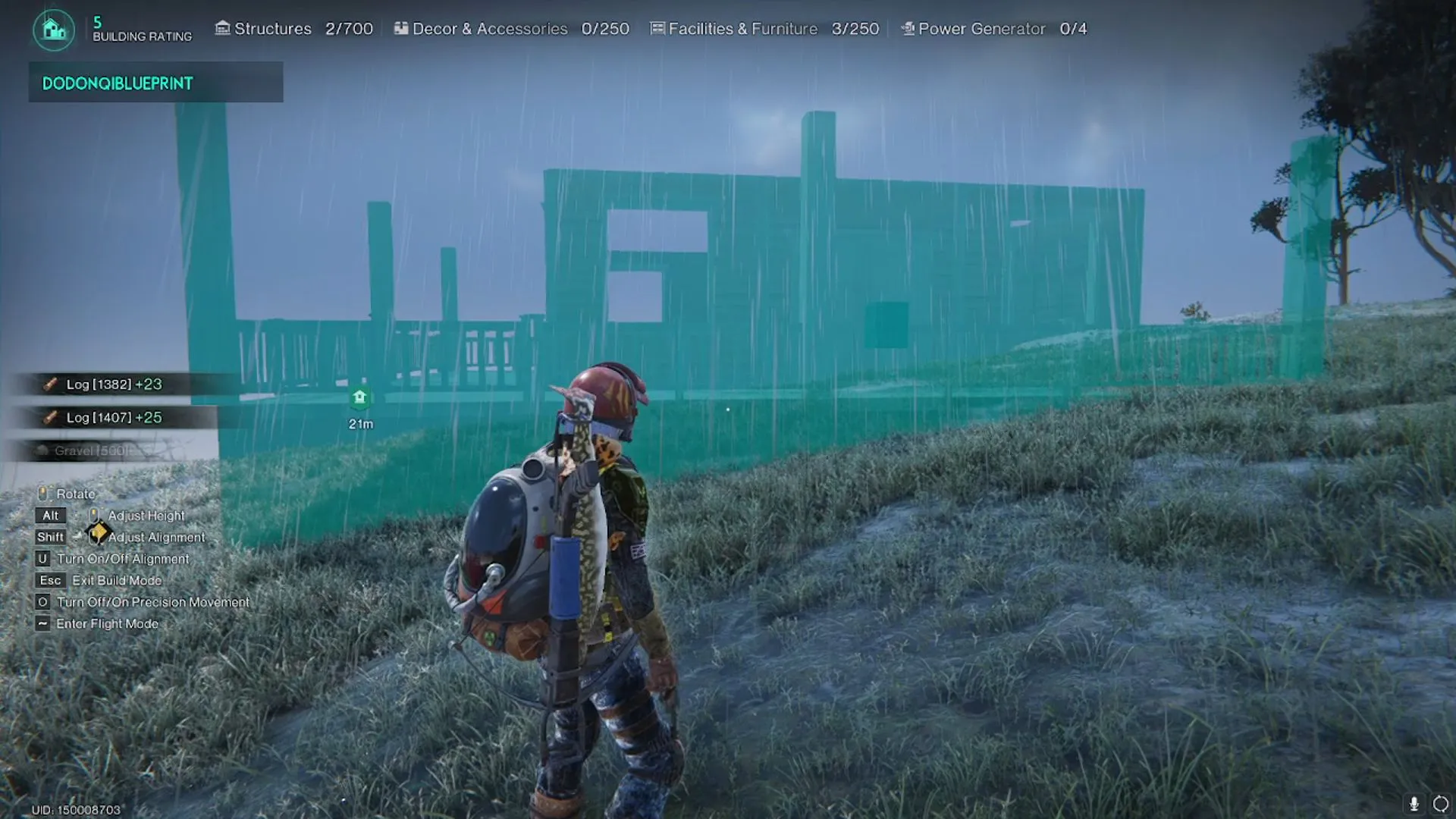
Seeing that structure pop back into existence gave me a rush—part relief, part genuine wonder. The blueprint system doesn’t just save blocks and walls, it saves all the little details: the specific materials, the furniture placement, even the direction the door faces so the sunrise hits your bed just right. It’s like having a gentle giant of a builder on speed dial who never forgets your weird tastes.
Lessons I Learned Along the Way
Over the months, I’ve picked up a few tricks that the game doesn’t spell out. First, always keep your blueprint updated. After I added that metal shelf for extra storage, I forgot to re‑save. When I next deployed the blueprint, the shelf was missing, and I ended up with a mysterious empty space where my favourite rifle used to sit. Second, communicate with your blueprints. I started adding notes like “Winter layout—add heaters” or “Max turret coverage” so I could swap layouts depending on the season or threat level. It became a diary of survival. And third, don’t be afraid to share. I once helped a newbie by trading them a copy of a compact, efficient shack blueprint via the in‑game blueprint link feature (you can generate a code to share with others). The look on their face when their bare territory suddenly had a cozy cabin… priceless.
The blueprint tab itself has grown on me. I think of it as a wise old archivist sitting in the corner of the build menu, quietly collecting all my panic-driven constructions and clever contraptions. Whenever I mess up a build, I can just scrap it and pull out a saved draft, no tears shed. It’s the safety net every survivor deserves.
Why It Matters in 2026’s Once Human
Since the game has evolved with updates through 2025 and into 2026, the blueprint system has only gotten more robust. I’ve heard whispers that new tagging options and better sharing functions are in the works, maybe even a community blueprint market. But at its core, it’s still the same dependable tool that saves sanity. In a world where everything else is trying to eat you, explode, or mutate, having the power to preserve a piece of home is a quiet act of rebellion. So next time you finish building something that makes you smile, pause. Right-click. Add Blueprint. Name it something silly. And know that no matter how many times the Stardust reshapes the land, a little piece of your creativity can live on.
That crooked porch? It’s still with me, through three territory moves and a close encounter with a giant spider. Every time I place it down, I hear the game almost chuckle, and I grin right back.