How to Share Base Building Permissions in Once Human: A Complete Guide
Master Once Human base sharing by granting Allow Build and Allow Storage permissions through friends or hive lists.
I've spent countless hours in the post-apocalyptic world of Once Human, and if there's one thing I've learned, it's that survival is always better with friends. Building a base together isn't just about pooling resources—it’s about creating a fortress that reflects the combined creativity of your entire group. But before you can start placing walls and crafting stations side by side, you need to understand how permissions work. Back when I first started playing in 2024, the system was already robust, and by 2026 it remains one of the most flexible I’ve seen in a survival game. Let me walk you through the entire process, from the basics of granting access to the subtle differences between permission levels that can make or break your team’s trust.
The core of base sharing in Once Human revolves around two key permission types: Allow Build and Allow Storage. Granting Allow Build gives another player complete control to modify your base—they can place, remove, or rotate structures just as you would. It’s perfect for a trusted duo or a small hive where everyone contributes to the architectural vision. On the other hand, Allow Storage is a more conservative option that lets friends open your storage containers and use crafting stations without altering the actual layout. This is ideal when you want to share resources but not risk someone accidentally (or intentionally) dismantling a critical support beam. I always recommend being deliberate with these permissions; there’s nothing worse than logging in to find your automated farm half-demolished because you gave the wrong person building rights.
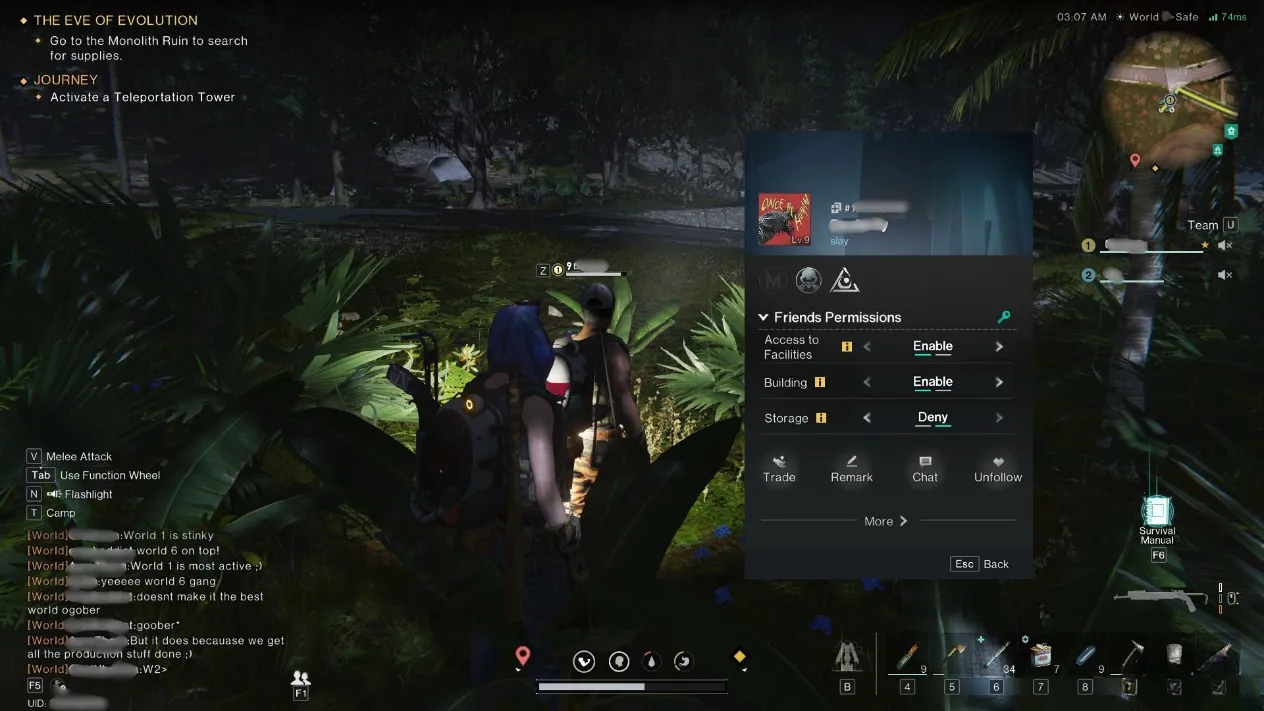
There are two main ways to set these permissions, and both are incredibly intuitive once you know where to click. The first method uses your friends list, which is my go‑to whenever I want to give temporary access to a new ally. Here’s what you do: open your friends list, locate the name of the person you want to invite, right‑click on it, and select Friends Permissions. A small menu pops up with the two options I mentioned. Tick the boxes you want, confirm, and the change takes effect immediately. The player doesn’t need to be in your hive for this to work, which means you can collaborate with anyone on your server regardless of hive affiliation. I’ve used this countless times when a random teammate helps me fend off a wave of Deviants and I want to reward them with a quick loot share.
The second method targets hive members specifically, and it’s a lifesaver for organized groups. If you’re part of a hive (and you really should be for the end‑game content), you can manage permissions directly from the hive list. The process is almost identical: bring up the hive roster, right‑click the player’s name, and choose Friends Permissions. From there, you can assign either Allow Build or Allow Storage. What makes the hive list so powerful is that it streamlines collaboration across up to eight permanent members. In my current hive, we’ve designated one builder who has construction rights on everyone’s base, while the rest of us keep only storage access to avoid chaos. Setting this up early on saves dozens of arguments about who placed that ugly turret.
A few pro tips from my own trial‑and‑error: first, always double‑check your settings after a major update. The Once Human developers occasionally tweak UI elements, and I once gave Allow Build to my entire hive by accident after a patch shifted a checkbox. Second, you can revoke permissions at any time by simply unchecking the same boxes. I’ve developed a habit of doing a weekly audit on who has access to what, especially after inviting newcomers. Finally, remember that permission levels don’t stack in a weird way—if a player has Allow Build, they automatically have Allow Storage as well, so you don’t need to tick both.
Troubleshooting common issues is part of the journey. If a friend can’t build even after you’ve granted permission, make sure they’re standing within your base’s border (the highlighted circle on the ground) and that they’ve accepted your permission settings on their end if prompted. Sometimes a quick relog fixes sync problems that have persisted since the game’s launch window. Also, note that some advanced structures, like the Staroid Resonator, might still be locked behind individual progression tiers regardless of building rights—so don’t panic if your friend’s construction menu looks different from yours.
In 2026, base sharing in Once Human is smoother than ever, but the fundamentals remain unchanged. Whether you’re using the friends list for a one‑time collaboration or the hive list for a long‑term building team, the ability to delegate responsibilities turns a simple shelter into a thriving community hub. I’ve seen groups erect entire cities using these features, and it all starts with that one right‑click. So go ahead, open your friends list, and let someone else help you fortify your corner of the wasteland. You’ll be amazed at what you can create together.